How do I collocate my Clarity device with a reference monitor?
Collocation means placing your Clarity devices right next to a trusted reference monitor for a stretch of time. You do it to quantify your devices' accuracy or to run a custom collocation-based calibration. This article walks through choosing a site, installing your devices, and sending Clarity the details.
Before you start
- Plan to collocate for at least 4 weeks continuously, so a range of conditions and concentrations is captured.
- Clarity needs access to the reference monitor's hourly data to perform a remote calibration, make sure you can access and share it.
- Have your device deployment materials ready.
1. Choose a collocation site
The site you pick determines how good your calibration can be. When selecting a reference monitor, look for these things:
- It's operated and regularly maintained to government standards.
- It provides hourly PM2.5 and/or NO₂ measurements you can access and share with Clarity.
- You can collocate there for at least 4 weeks continuously.
- It's representative of where you'll actually use the device, ideally near your project site, with a similar pollutant mix, environmental conditions, and distance from the road.
- It reports enough variability in PM2.5 and NO₂ to support a proper calibration and performance evaluation.
- It has good cellular connection and solar exposure, if you're running on solar power.
Note: If concentrations at the site are low, you may need to extend the collocation by 2 weeks. Very low concentrations also produce a poorer calibration model, because indicative sensors (and reference monitors) generally have higher relative errors at low concentrations.
Depending on the pollutant you're monitoring, the site also needs to meet these requirements:
| PM2.5 | NO₂ | |
|---|---|---|
| Collocation duration | Minimum 4 weeks | Minimum 4 weeks |
| Number of devices collocated | At least 3 Nodes (collocate all of them if your project has fewer than 3) | All Nodes |
| Reference data resolution | Hourly or sub-hourly | Hourly or sub-hourly |
| Reference data concentrations | At least one daily (24h) average above 25 µg/m³ | At least one daily (24h) average above 15 ppb |
| Environmental conditions | Similar temperature and humidity to your final deployment sites | Collocate during a month with representative temperature and humidity ranges |
| Source conditions | Similar pollution sources to your final deployment sites | N/A |
2. Install your devices at the site
Correct installation ensures your devices and the reference monitor are exposed to the same air.
- Deploy your devices following Clarity's deployment instructions.
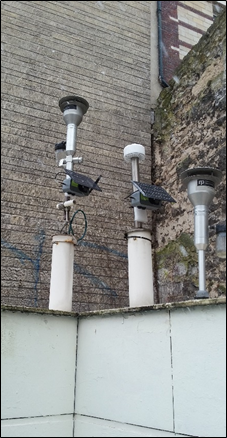
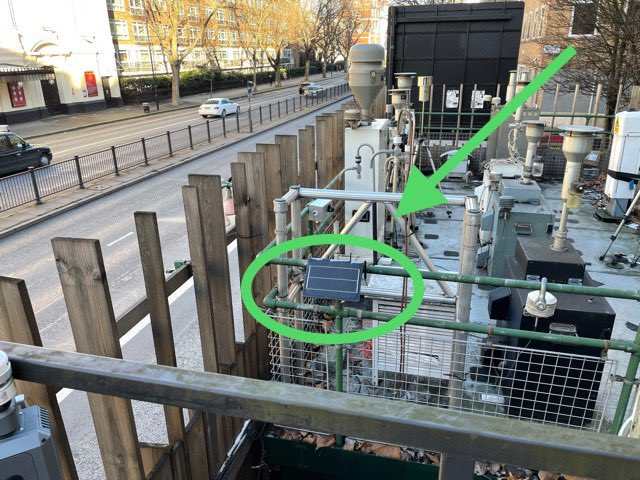
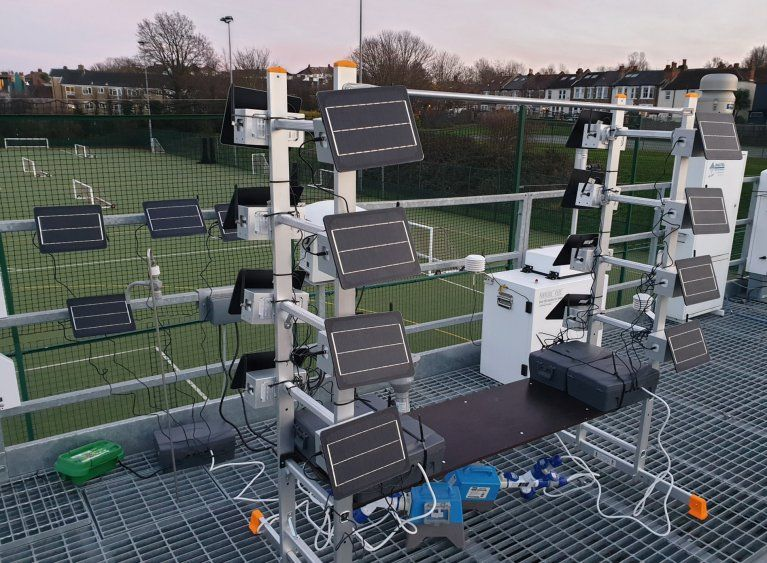
- Install each device alongside the reference monitor, as near the reference inlet as possible, within 10 m of the reference station is acceptable.
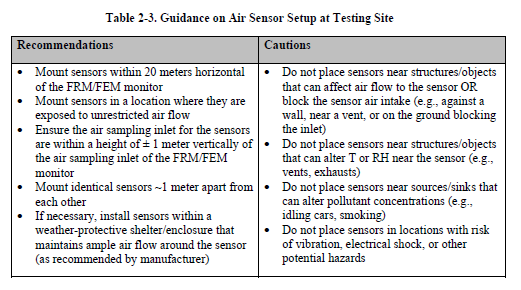
For more detail, these are the guidelines the USEPA developed for collocation testing (Table 2-3 in the Performance Testing Protocols, Metrics, and Target Values for Fine Particulate Matter Air Sensors guide).
3. Send Clarity the collocation details
If Clarity is doing the analysis, this is what lets it run.
- Email support@clarity.io with:
- The date and time the devices were installed.
- The reference site name.
- How you'll provide the reference data (API, CSV files, and so on) if it isn't openly available.
- If you'll be doing the analysis yourself, the USEPA publishes an air sensor collocation instruction guide.
- If the reference data is public and Clarity is collecting it, you can compare your Clarity data to the reference directly in the Dashboard, see comparing your collocated device to a reference monitor.
You're done! Your devices are collocated and Clarity has what it needs to evaluate their performance.
What's next
Still need a hand? Email us at support@clarity.io or create a support ticket, and our team will get back to you.
Was this helpful?