Fetching measurements from the API: Migrating from v1 to v2
If you've been pulling measurements with the Clarity API v1, this article explains what changed in v2 and how to update your requests. The short version: v2 organizes measurements around a stable Datasource instead of an individual device, and it splits measurement fetching into a "recent data" path and a "large historical download" path.
So you know: This article describes the API as of January 2024. The full, current reference always lives in the API Guide.
Why v2 works differently
In v1, a measurement time-series is tied to the specific device that generated it. That causes problems:
- If a device fails and is replaced, you want a time-series that stays continuous across the swap.
- If a device is moved, you want a time-series tied to one placement, not the device.
- Different device types produce differently shaped data, and it helps to have one common way to work with all of them.
To solve this, v2 introduces an abstract Datasource that produces datasource-measurements. Over time, a Datasource may have been powered by different physical devices, but the time-series stays continuous.
How v1 worked
In v1, if you didn't already know the device codes, you'd list the available devices, then fetch a time-series for a specific device code.
Fetch devices (see API Guide):
GET {baseUrl}/v1/devices ? org=myorg1234
The response includes a code for each Clarity Node, for example A1234567.
Fetch a device's measurements (see API Guide):
GET {baseUrl}/v1/measurements ? org=myorg1234 & code=A1234567
Additional query parameters let you tune the request, most commonly the output frequency and the time period.
One quirk of v1: the meaning of an attribute depends on the output frequency. If you asked for individual measurements (outputFrequency: minute), pm2_5ConcMass.value is that moment's PM2.5 mass concentration. If you asked for hourly aggregation (outputFrequency: hour), the same attribute name now means the 1-hour mean. v2 changes this.
Note: Some v1 endpoint parameters changed in the corresponding v2 endpoints. Those details were published in an earlier March 2023 article, What's next for the Clarity API.
How v2 works
In v2 you start by listing your Datasources rather than individual devices. For each Datasource you can learn things like which physical device powered it during a given period. The v2 API then splits measurement fetching into two endpoints for two use cases:
- Recent measurements: a small number of recent readings, returned as JSON. Good for applications tracking what's happening today.
- Historical measurements: a large time-series, delivered as a downloadable file (CSV or Apache Parquet). Good for data science workflows in tools like Pandas.
A historical request is a request for a report, meaning a dataset in a file, and it has three phases: request the report, poll to see when it's ready, then download it.
Working with Datasources
Fetch the org's Datasource summary (see API Guide):
GET {baseUrl}/v2/datasources ? org=myorg1234
The response includes a datasourceId for each Datasource, for example DDDYN3547.
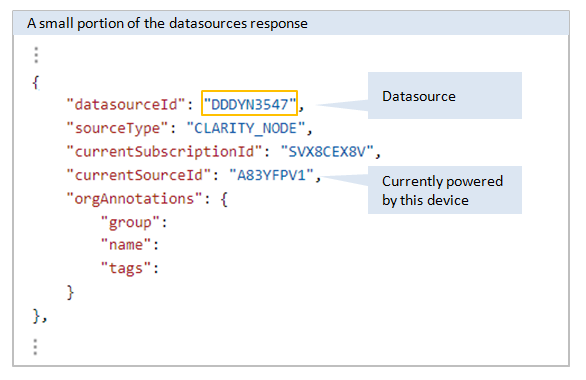
Note: In v1 a device is identified by code; in v2 a device within a Datasource is identified by currentSourceId. You can retrieve the full source history of all devices in a Datasource over time using the per-datasource details endpoint.
Fetching recent measurements
Fetch recent measurements (see API Guide):
POST {baseUrl}/v2/recent-datasource-measurements-query
In the body, you specify the org and whether you want all Datasources in the org or a specific list of Datasource IDs. Example responses are in the API Guide.
Fetching historical measurements
This is the three-phase report flow.
-
Request the report (see API Guide):
POST {baseUrl}/v2/report-requestsIn the body, specify the org and whether you want all Datasources or a specific list. The response gives you a report Job ID to poll, for example
JBDLPB37C6.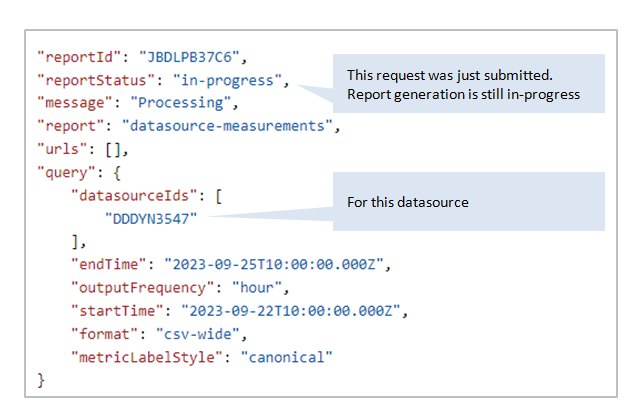
-
Poll the report (see API Guide):
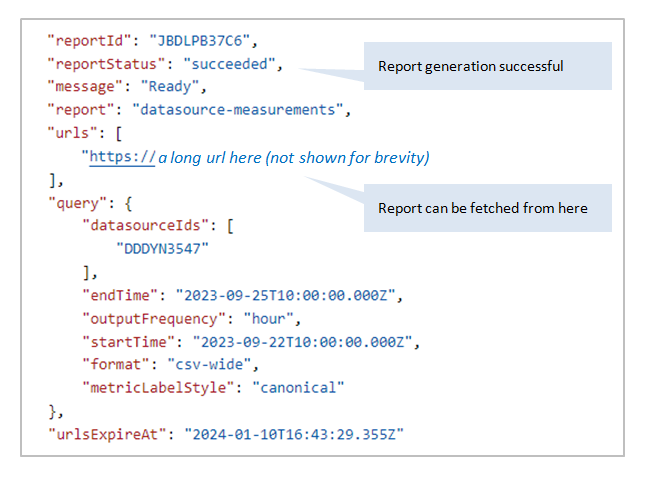
GET {baseUrl}/v2/report-request/JBDLPB37C6The response tells you the status. When it succeeds, you also get a list of URLs to download. A report would have to be enormous to span more than one file, so you'll almost always see a single URL.
-
Download the report. There's no endpoint for this step; you just read the bytes from the URL returned in step 2. There's example Python code in the API Guide's "How to request and retrieve reports" section.
What's next
Still need a hand? Email us at support@clarity.io or create a support ticket, and our team will get back to you.
Was this helpful?